Skip to content

Bubba On The Road

Also Bubba So Smart

  • Home
  • About Us
    • Tiffany, Eric & Our Cats
    • Our Businesses
      • Sweet Honeybee Health
      • War Possum
  • Our Projects
    • CamperVan
    • Off the Grid
    • Smart Home
    • Smart Home on Wheels
  • Reviews
  • Store
You are here
Home > Technology (Page 4)

Category: Technology

Winegard Rayzar Automatic Installation and Review

November 14, 2018 eric
Winegard Rayzar Automatic Installation and Review
I received a Winegard Rayzar Automatic RV TV Antenna from Winegard for installation and review in our Smart Home on Wheels. The installation was easy, setting it up to work on our TVs was simple, and so far it is...
Product Reviews, Technologyantenna, over the air, rayzar, rayzar automatic, rv, tv, winegard2 Comments

Portable Washing Machine Maintenance

October 4, 2018 eric
Portable Washing Machine Maintenance
We have a small Gaintex Portable Washing Machine that we bought almost a year ago. It has served us well and we usually do one load of laundry a day to keep on top of our laundry. Since I am...
Camping, Technologybleach, borax, clean, cleaning, clothes, clothes washer, detergent, maintenance, portable washer, preventative, washing machineLeave a comment

Organizing the Electronics Cabinet

September 6, 2018September 6, 2018 eric
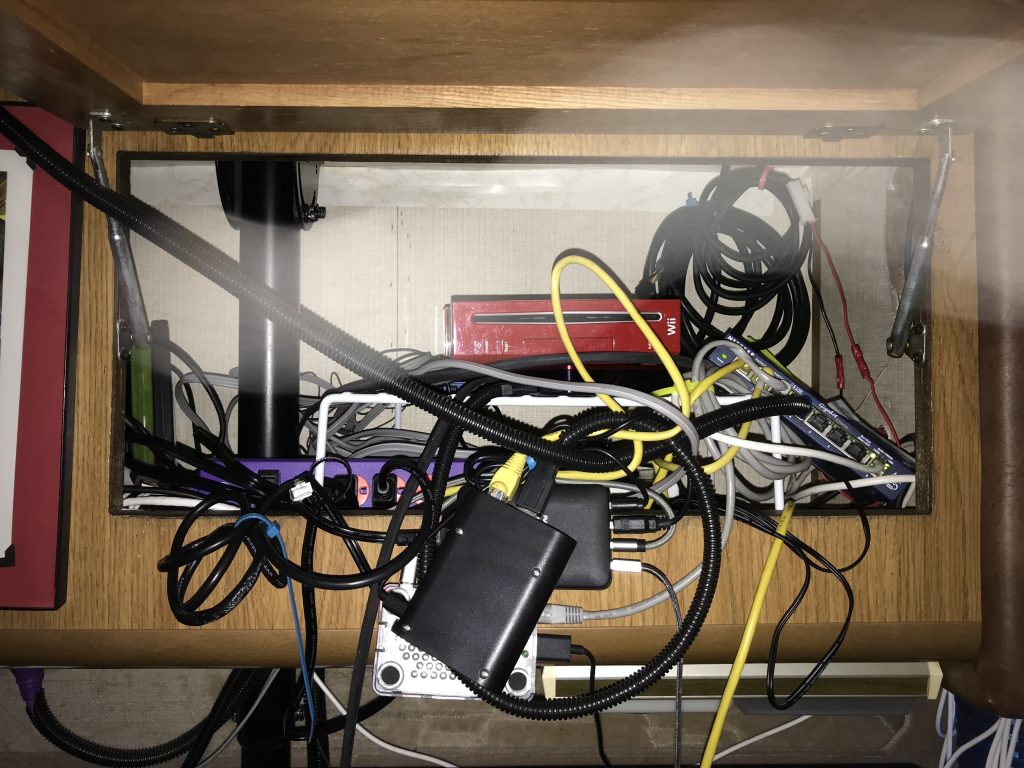
Organizing the Electronics Cabinet
Up above our TV, we have the electronics cabinet. It is filled with, obviously, electronics. As we've added new devices, things have just kind of been shoved in there randomly. Wires are all over the place. Raspberry Pis are hanging...
Renovations, Smart Home on Wheels, Technology1 Comment

Winegard ConnecT 2.0 Review and Installation

September 3, 2018June 27, 2019 eric
Winegard ConnecT 2.0 Review and Installation
I received a Winegard ConnecT 2.0 4G2 (WF2-435) 4G LTE and Wi-Fi Extender for RVs for review. This device is simple to install, easy to setup, and works reliably as much as we've used it. For an in depth description...
Product Reviews, Smart Home on Wheels, Technology, Uncategorizedconnect 2.0, internet, lte, technology, wifi, winegard2 Comments

Setting up an Ubuntu Server

July 12, 2018August 12, 2018 eric
Setting up an Ubuntu Server
I always have projects I'm working on in the RV, and I always come up with new and better ways to get them accomplished. I find a problem, figure out a solution, and before I implement that solution, I re-examine...
Smart Home on Wheels, Technologynas, Plex, server, ubuntuLeave a comment

The Next Pi Project: Smart Pantry

July 4, 2018 eric
The Next Pi Project: Smart Pantry
As new ideas come to me, I have to come up with new solutions. My latest problem to solve is how to know what is in our pantry when I can't easily see what is all the way in the...
Cooking, Smart Home on Wheels, Technologydatabase, pantry, pi, raspberry pi, smart, web server1 Comment

Running Ethernet Under Sub-Optimal Conditions

June 27, 2018 eric
Running Ethernet Under Sub-Optimal Conditions
Rvs are not generally wired for ethernet. In fact, I've never heard of one that had ethernet run through the coach. Its also not like a house where there are voids in the walls and other cables that can be...
Renovations, Smart Home on Wheels, Technologyconnectivity, ethernet, internet, raspberry pi, wifiLeave a comment

Keeping the RV Bug-Free

June 18, 2018August 12, 2018 eric
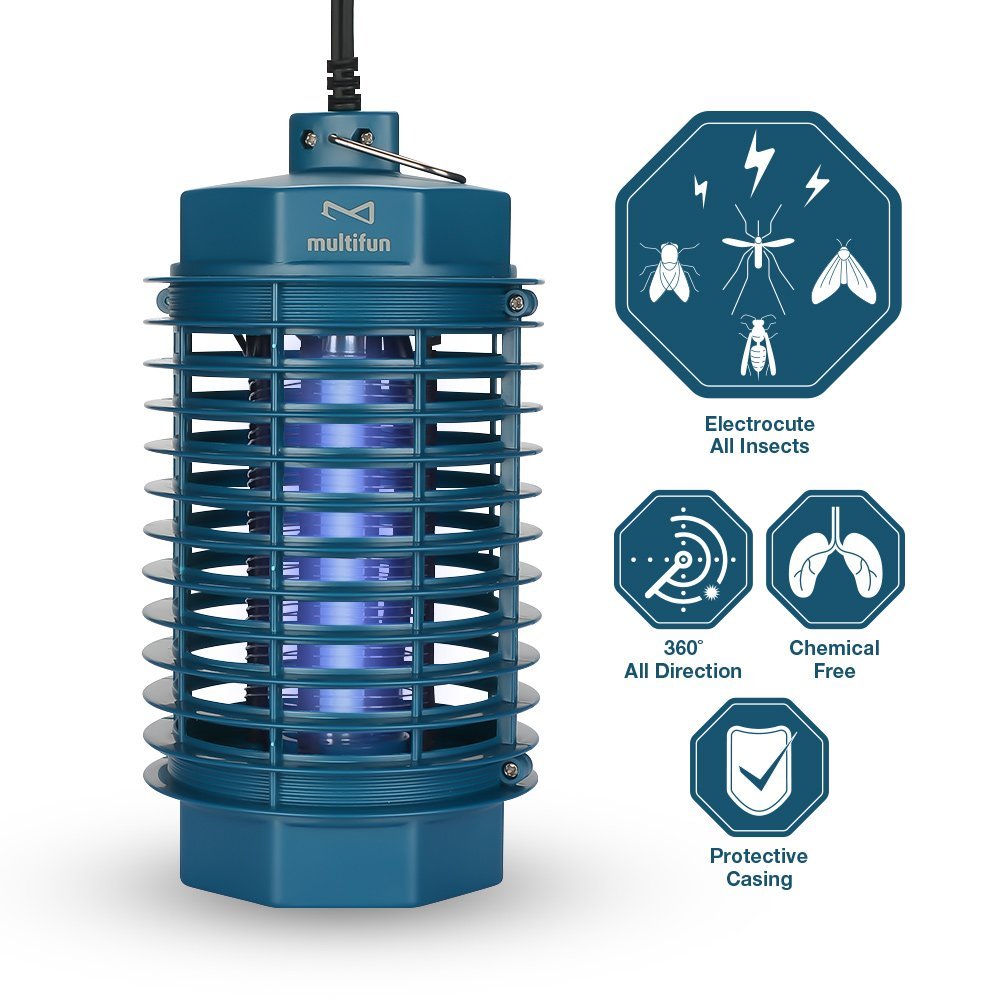
Keeping the RV Bug-Free
Its inevitable, bugs get inside RVs. It can't really be avoided, whether ants, flying bugs, or disgusting crawling things like roaches. This is about the flying ones though. This is about something simple and cheap: a bug zapper. We bought...
Camping, Product Reviews, Technologybug zapper, bugs, pest control, pestsLeave a comment

Building a Raspberry Pi Network

June 13, 2018August 12, 2018 eric
Building a Raspberry Pi Network
This is mainly focused on the full time RVers reading this, but there are still ideas to be mined for others. This is the layout for how our network is getting built and what each Raspberry Pi will do in...
Renovations, Smart Home on Wheels, Technologykodi, nas, network, pi, Plex, retropie, smart home, surveillance, wifiLeave a comment

Computers, Networks, and How to Keep a Blog Running

June 9, 2018 eric
Computers, Networks, and How to Keep a Blog Running
I'm going through what I want to have in the RV, what we already have, and what we can adapt to make work for our situation. As we are professional bloggers, it is important that we be able to connect...
Renovations, Smart Home on Wheels, Technologyapple, blogging, chromebook, computers, ethernet, networking, smart homeLeave a comment

Posts navigation

Older posts
Newer posts

Privacy Policy

Categories

Recent Posts

  • LIFX Bulbs vs Eero Wifi October 1, 2025
  • Bubba Builds a House, Part III September 28, 2025
  • How to Make the Most of a Weekend RV Trip April 14, 2025
  • How to Transform Your Vehicle into an Off-Road Beast July 7, 2024
  • Bubba Builds a House, Part Two May 9, 2024

Top Posts & Pages

  • Making the Whole RV Connected. Apple-style!
    Making the Whole RV Connected. Apple-style!

Archives

Recent posts from Sweet Honeybee Health: sweet honeybee health

How to Remodel Your Home Into a Calm, Flexible Wellness Space

How to Remodel Your Home Into a Calm, Flexible Wellness Space

For busy parents juggling work, wellness, and a house that has to do everything, home wellness remodeling can feel like trying to squeeze a gym, a quiet corner, and a storage closet into one room. The core tension is real: a multipurpose wellness space needs to support movement and recovery, but most limited home space challenges turn a fitness and relaxation room into a cluttered compromise. The goal isn’t to cram in more stuff; it’s to shape a wellness-focused room design that works on ordinary weekdays, not just on the day it’s finished. A flexible space can make healthy routines feel simpler. What a Wellness Space Really Means A wellness space is a room designed to make healthy habits easier to start and easier to repeat. Instead of being only a gym or only a quiet nook, one flexible space supports movement, recovery, and downshifts, without forcing you to “pick one.” Growing demand reflected in the home fitness equipment market shows how normal it’s become to train at home. This matters because your environment shapes your follow-through. When the room makes setup simple and cleanup fast, you’re more likely to squeeze in a quick lift, stretch, or breath break. Over time, that consistency supports your body and steadies your mood. Think of it like a Swiss Army room: a mat and light weights for a 20-minute workout, a clear corner for mobility work, and soft lighting for five quiet minutes. It matches real life, especially when schedules change. With daily use rising, it helps to understand home warranty basics before the remodel adds wear. Protect Your Remodel: Understand Home Warranties in 5 Minutes Once you’ve defined what “wellness” looks like in your home, it helps to think about what keeps that room reliably comfortable day after day. A multipurpose wellness space often leans hard on the unglamorous basics, heating and cooling to keep workouts tolerable, electricity to power lights and any equipment, and steady performance so recovery and relaxation don’t get interrupted. When you’re using the room regularly, those systems can end up working a little harder, and normal wear and tear has more chances to show up over time. That’s why it can be worth understanding what is a home warranty and how a home warranty service agreement may help cover the repair or replacement of essential home systems, easing the sting of unexpected repair costs. Plan the Room: Layout, Storage, Lighting, and Materials That Last A calm, flexible wellness space doesn’t come from buying more gear, it comes from making smart “defaults” in the room so tidying up is quick and daily use doesn’t wear everything out. Draw the “zones” before you buy anything: Start wellness room layout planning with painter’s tape on the floor: mark a stretch zone, a quiet/seat zone, and a storage/charging zone. Leave a clear walking path (think: no hopping over mats) and keep the door swing and any closets usable. A simple layout beats fancy pieces, and it also helps you spot what changes might stress your home systems, useful when you’re deciding what coverage you’d want in a home warranty versus what you can handle yourself. Choose one anchor piece, then keep the rest movable: Pick a stable “home base” like a compact bench or comfy chair that works for breathwork, journaling, or putting on shoes. Build the room around portable items you can tuck away in under two minutes: a foldable mat, a small speaker, resistance bands, a lap desk. This multi-use room design strategy keeps the space flexible when life changes, injury weeks, busy seasons, or when guests need to sleep over. Make storage do double duty (and assign every item an address): Small-space storage works best when it’s part furniture, part organizer: an ottoman that holds props, a wall shelf that also displays a calming object, a mirror cabinet that hides toiletries. The idea that storage solutions can be multipurpose, sense of flexibility and openness matters here because the room feels bigger when storage isn’t just “bins on the floor.” Give every category one container (bands, blocks, tech) and stop when the container is full, no overflow piles. Layer your lighting like you layer your day: For lighting design for wellness, aim for three levels: bright/clear for movement and cleaning, medium for everyday, and low for winding down. Put the “calm” light sources at eye level or lower (table lamp, wall sconce) so you’re not staring at a bright ceiling fixture during meditation. The workplace guideline of soothing quiet spaces, neutral decor, adjustable lighting translates well at home: dimmable bulbs and warm tones make the room feel softer without changing the footprint. Pick durable, cleanable materials where bodies actually touch: Material choices for durability are mostly about the abuse zones: floor, walls near hooks, and any surface that holds bottles or weights. Choose wipeable paint in a scrubbable finish, a rug that can be washed or easily vacuumed, and a bench/chair fabric that won’t pill with daily sitting. If you’re adding outlets, a heater, or a dehumidifier, plan ventilation and load carefully so you don’t create “surprise repairs” that could have been avoided with better specs. Build a maintenance routine into the design (so it stays calming): Add one small “reset station” by the exit: a hamper or basket, a hook for towels, and a tiny tray for everyday items. Do a 3-minute reset after each use and a 15-minute weekly check for fraying straps, loose screws, or water leaks, tiny issues are easier to fix before they become warranty-level headaches. When the room is easy to maintain, it also feels less cluttered, less costly, and way more sustainable to keep using. Wellness Room Remodeling Questions, Answered Q: What if I only have a small spare corner, not a whole room? A: Start by choosing one activity you want to happen there daily, like stretching or quiet sitting. Mark a footprint that fits your body plus a clear step-in, step-out path, then build storage upward with a shelf and a hook. A defined mini zone often feels calmer than a crowded full room. Q: How do I keep it from turning into a clutter magnet again? A: Give every category one container and treat the container as the limit. Keep a small “drop spot” for the items you use every time so they never migrate. If resetting takes more than three minutes, remove one item. Q: Should I remodel now or wait for “a better time”? A: If you are doing light changes like paint, lighting, and storage, starting now is usually fine. Seeing private residential construction spending rise can be a reminder that contractors and materials may stay in demand, so a simple plan and a clear budget help you move without stress. Q: Can smart home upgrades actually help a wellness space, or are they a gimmick? A: They can be genuinely useful when they reduce friction. Adding smart thermostats or timed lighting can make the room feel comfortable automatically, so you show up more often. Pick one upgrade that solves an everyday annoyance. Q: How do I set it up so it stays clean without constant deep cleaning? A: Choose wipeable surfaces where hands and feet touch most, and keep a single spray and microfiber cloth within reach. Use a washable rug or a bare floor plus a mat so sweat and dust do not get embedded. Small, frequent resets beat weekend marathons. Start Small and Keep Building a Wellness Space That Works It’s easy to want a calm, flexible wellness space, but feel stuck between limited time, budget, and the fear it won’t stay tidy or get used. The way through is the mindset of thoughtful home design: make choices that support your real routines and reduce friction, instead of chasing a perfect “finished” room. Do that, and the wellness space benefits show up quietly, more movement, better rest, and fewer stress spikes that add up to long-term physical health and mental well-being improvements. Design for the life you live, and wellness becomes easier to practice.

Eric & Tiffany Baierl © 2019

X
Subscribe to be notified of updates and to our newsletter!

Click to sign up!
Please support this website by adding us to your whitelist in your ad blocker. Ads are what helps us bring you premium content! Thank you!